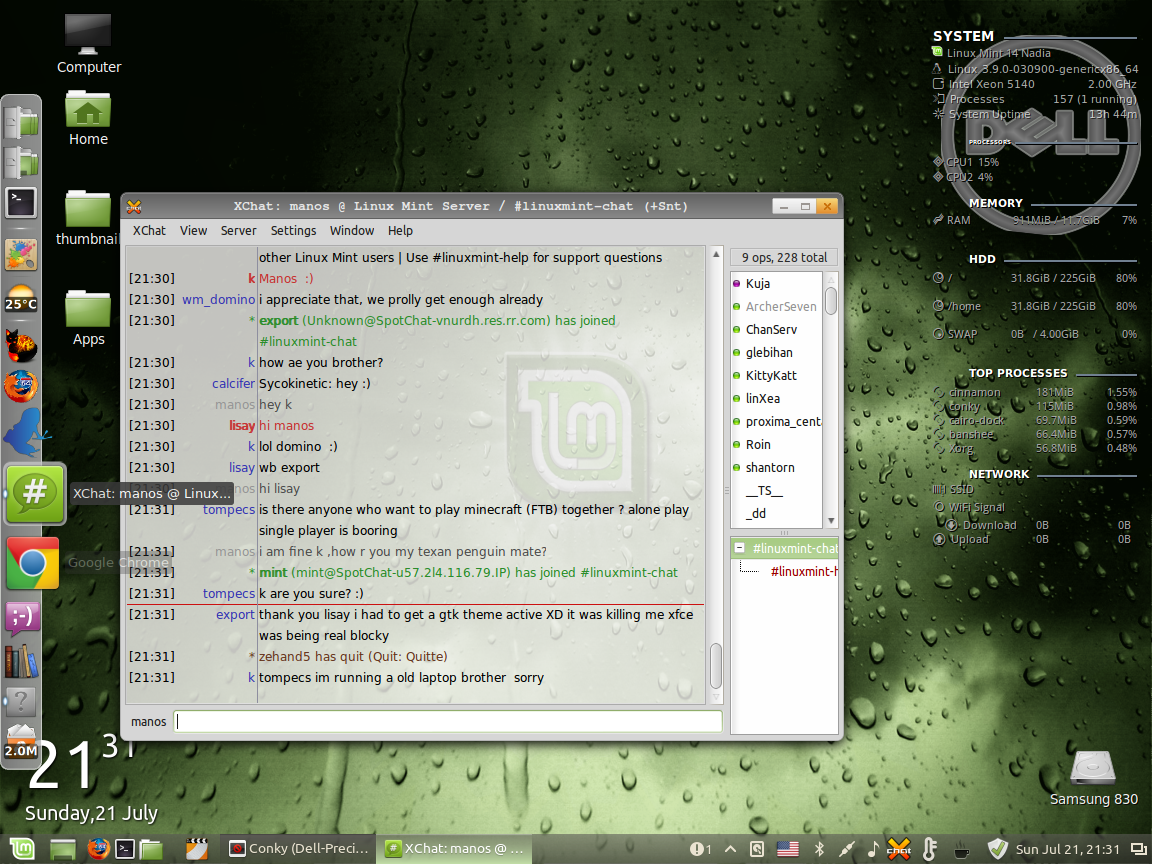
Install Conky, from the terminal type...
sudo apt-get install conky-all
Test Conky, from the terminal type...
conky
In /home/[user]/ create a file .conkyrc
background no
    font system:size=8
    #xftfont sans:size=10
    use_xft yes
    xftalpha 0.6
    update_interval 1.0
    total_run_times 0
    own_window yes
    own_window_transparent yes
    own_window_hints undecorated,below
    own_window_type normal
    double_buffer yes
    minimum_size 205
    maximum_width 230
    draw_shades yes
    draw_outline
    draw_borders no
    draw_graph_borders yes
    default_color white
    default_shade_color black
    default_outline_color green
    alignment top_right
    gap_x 15
    gap_y 15
    no_buffers yes
    uppercase no
    cpu_avg_samples 2
    override_utf8_locale no
    uppercase no
    # Define some Colors
    color0 white      # Headings
    color1 slategrey   # Horizonal lines
    color2 darkgrey      # Text
    ####
    ## Load Lua for bargraphs
    ## Set the path to your script here.
    #
    #lua_load ~/.conky/bargraph_small.lua
    #lua_draw_hook_post main_bars
    TEXT
    ###########################
    # System Information
    ###########################
${image /home/manos/Pictures/icons/dell3.png -p 20,20 -s 200x200}
    ${color0}${font Neuropolitical:size=10:bold}SYSTEM ${color1} ${hr 2} ${color2}${font}
    ${voffset 2}${font OpenLogos:size=12}${color2}${voffset -4}${image /home/manos/Pictures/icons/linux.mint.logo.png -p 10,30 -s 12x12}${font DroidSans:size=8.6}${color2}${offset 14}${pre_exec lsb_release -sd || cat /etc/*release}${font}
    ${voffset 2}${offset -2}${font OpenLogos:size=12}${color2}t${voffset -4}${font}${color2}${offset 6}${sysname}${offset 5}${kernel}${alignr}${machine}
    ${voffset 2}${font StyleBats:size=10}${color2}A${voffset -1}${font}${color2}${offset 5}Intel Xeon 5140${alignr}${freq_g cpu0} GHz
    ${voffset 2}${font StyleBats:size=10}${color2}z${voffset -1}${font}${color2}${offset 5}Processes${alignr}${alignr}$processes ($running_processes running)
    ${voffset 2}${font StyleBats:size=10}${color2}q${voffset -1}${font}${color2}${offset 5}System Uptime${alignr}${uptime_short}
    ###########################
    # CPU and Processes
    ###########################
    ${color0}${font Neuropolitical:size=4:bold}PROCESSORS ${color1} ${hr 2} ${color2}${font}
    ${voffset 4}${font StyleBats:size=9.9}${color2}k${voffset -2}${font DroidSansFallback:size=8.39}${color2}${offset 2}CPU1${offset 5}${font DroidSans:size=8.3}${cpu cpu1}%${font}
    ${voffset 2}${font StyleBats:size=9.9}${color2}k${voffset -2}${font DroidSansFallback:size=8.39}${color2}${offset 2}CPU2${offset 5}${font DroidSans:size=8.3}${cpu cpu2}%${font}

    ###########################
    # Memory
    ###########################
    ${color0}${font Neuropolitical:size=8:bold}MEMORY ${color1} ${hr 2} ${color2}${font}
    ${voffset 4}${font StyleBats:size=10}${color2}l${voffset -2}${font DroidSansFallback:size=8.3}${color2}${offset 3}RAM${goto 97}${font DroidSans:size=8.3}${mem} / ${memmax}${alignr}${memperc}%${font}
    ###########################
    # HDDs
    ###########################
    ${color0}${font Neuropolitical:size=8:bold}HDD ${color1} ${hr 2} ${color2}${font}
    ${voffset 6}${font StyleBats:size=9.9}${color2}x${voffset -2}${font DroidSansFallback:size=8.3}${color2}${offset 4}/${goto 95}${font DroidSans:size=8.3}${fs_used /} / ${fs_size /}${alignr}${fs_free_perc /}%${font}
    ${voffset 15}${font StyleBats:size=9.9}${color2}x${voffset -2}${font DroidSansFallback:size=8.3}${color2}${offset 4}/home${goto 95}${font DroidSans:size=8.3}${fs_used /home} / ${fs_size /home}${alignr}${fs_free_perc /home}%${font}
    ${voffset 15}${font StyleBats:size=9.9}${color2}4${voffset -2}${font DroidSansFallback:size=8.3}${color2}${offset 4}SWAP${goto 95}${font DroidSans:size=8.3}${swap} / ${swapmax}${alignr}${swapperc}%${font}
    ###########################
    # Top Processes
    ###########################
    ${color0}${font Neuropolitical:size=8:bold}TOP PROCESSES ${color1} ${hr 2} ${color2}${font}
    ${voffset 6}${font StyleBats:size=10}${color1}h${voffset -1}${font DroidSans:size=8.65}${color2}${offset 5}${top_mem name 1}${goto 120}${font DroidSans:size=8.3}${top_mem mem_res 1}${alignr}${top_mem mem 1}%${font}
    ${voffset 1}${font StyleBats:size=10}${color1}h${voffset -1}${font DroidSans:size=8.65}${color2}${offset 5}${top_mem name 2}${goto 120}${font DroidSans:size=8.3}${top_mem mem_res 2}${alignr}${top_mem mem 2}%${font}
    ${voffset 1}${font StyleBats:size=10}${color1}h${voffset -1}${font DroidSans:size=8.65}${color2}${offset 5}${top_mem name 3}${goto 120}${font DroidSans:size=8.3}${top_mem mem_res 3}${alignr}${top_mem mem 3}%${font}
    ${voffset 1}${font StyleBats:size=10}${color1}h${voffset -1}${font DroidSans:size=8.65}${color2}${offset 5}${top_mem name 4}${goto 120}${font DroidSans:size=8.3}${top_mem mem_res 4}${alignr}${top_mem mem 4}%${font}
    ${voffset 1}${font StyleBats:size=10}${color1}h${voffset -1}${font DroidSans:size=8.65}${color2}${offset 5}${top_mem name 5}${goto 120}${font DroidSans:size=8.3}${top_mem mem_res 5}${alignr}${top_mem mem 5}%${font}
    ###########################
    # Network
    ###########################
    ${color0}${font Neuropolitical:size=8:bold}NETWORK ${color1} ${hr 2} ${color2}${font}
    ${voffset 4}${font StyleBats:size=10}y${voffset -3}${font DroidSans:size=8.65}${color2}${offset 5}SSID${font DroidSans:size=8.3}${alignr}${wireless_essid wlan1}${font}
    ${voffset 4}${font StyleBats:size=10}n${font DroidSans:size=8.65}${color2}${offset 5}WiFi Signal${font}
    #${voffset 4}${font StyleBats:size=10}n${font DroidSans:size=8.65}${color2}${offset 5}WiFi Signal${font DroidSans:size=8.3}${alignr}${wireless_link_bar 6, 140 wlan1}${font}
    ${voffset 4}${font PizzaDudeBullets:size=9.5}T${font DroidSans:size=8.65}${color2}${offset 5}Download${goto 120}${font DroidSans:size=8.3}${totaldown wlan1}${alignr}${font DroidSans:size=8.3}${downspeed wlan1}${font}
    ${voffset 0}${font PizzaDudeBullets:size=9.5}N${font DroidSans:size=8.65}${color2}${offset 5}Upload${goto 120}${font DroidSans:size=8.3}${totalup wlan1}${alignr}${font DroidSans:size=8.3}${upspeed wlan1}${font}
Since i have dell i used that image for background you can modify or delete
${image /home/manos/Pictures/icons/dell3.png -p 20,20 -s 200x200}

The mint logo is that depends on you resolution may need a bit customization
${image /home/manos/Pictures/icons/linux.mint.logo.png -p 10,30 -s 12x12}

Another conky also run on my cinnamon.This have also weather time date ,
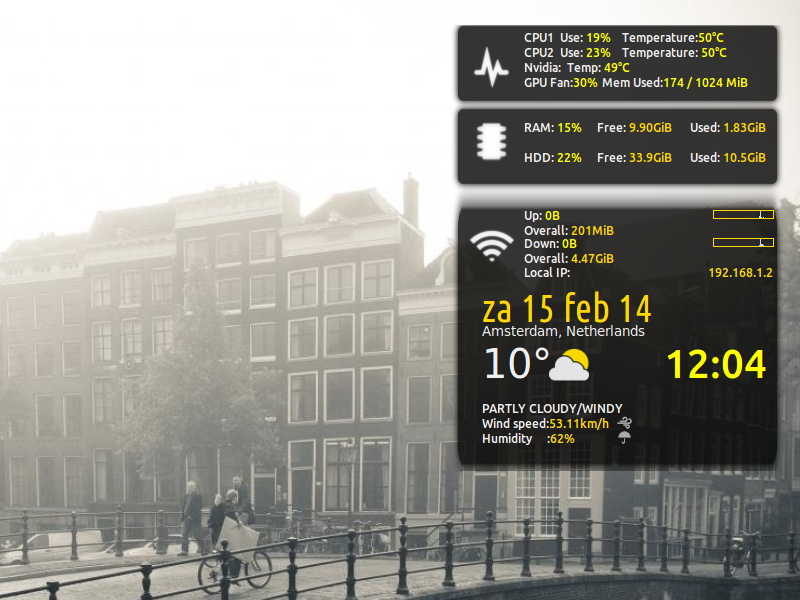
This is the .conkyrc copy and save it in your home directory.
########################
# Nvidia suport        #
# GPU temp fan_speed   #
#     memory use       #
# tested xfce cinnamon #
#   Mint 16            #
########################
######################
# - Conky settings - #
######################
update_interval 1
total_run_times 0
net_avg_samples 1
cpu_avg_samples 1
imlib_cache_size 0
double_buffer yes
no_buffers yes
#####################
# - Text settings - #
#####################
use_xft yes
xftfont Ubuntu:size=9
override_utf8_locale yes
text_buffer_size 2048
#############################
# - Window specifications - #
#############################
own_window_class Conky
own_window yes
own_window_type desktop
own_window_transparent yes
own_window_hints undecorated,below,sticky,skip_taskbar,skip_pager
#own_window_argb_visual yes
#own_window_argb_value 100
alignment tr
gap_x 12
gap_y 30
minimum_size 350 300
default_bar_size 60 8
#########################
# - Graphics settings - #
#########################
draw_shades no
default_color efefef
default_shade_color 1d1d1d
color0 ffffff
color1 yellow
color2 gold
TEXT
${voffset -15}
${goto 92}CPU1  Use: ${font Ubuntu:style=Bold:size=9}${color1}${cpu cpu1}%  ${font}${color}${goto 190}Temperature:${color1}${font Ubuntu:style=Bold:size=9}${color1}${exec sensors | grep 'Core 0' | cut -c16-17}°C${font}${color}  ${goto 92}
${goto 92}CPU2  Use: ${font Ubuntu:style=Bold:size=9}${color1}${cpu cpu2}%${font}${color}${goto 190}Temperature: ${font Ubuntu:style=Bold:size=9}${color1}${exec sensors | grep 'Core 1' | cut -c16-17}°C${color}${font}
${goto 92}Nvidia: ${font Ubuntu:style=Bold:size=9}${color1}${exec nvidia-smi --query-gpu=temperature.gpu|grep Product| cut -d ":" -f2}${color} Temp: ${font Ubuntu:style=Bold:size=9}${color1}${exec nvidia-smi -q -d temperature |grep Gpu | cut -d ":" -f2|cut -c2-3}°C${color}${font}
${goto 92}GPU Fan:${font Ubuntu:style=Bold:size=9}${color1}${execi 5 nvidia-settings -q [fan:0]/GPUCurrentFanSpeed -t}%${font}${color}${goto 170}Mem Used:${color1}${font Ubuntu:style=Bold:size=9}${color1}${execi 5 nvidia-settings -q [gpu:0]/UsedDedicatedGPUMemory -t} / ${exec nvidia-settings -q [gpu:0]/TotalDedicatedGPUMemory -t} MiB${font}${color}
${goto 92}RAM:${color1} ${font Ubuntu:style=Bold:size=9}${memperc}%${font}${color}${font Ubuntu:style=Bold:size=9}${font}     Free: ${font Ubuntu:style=Bold:size=9}${color2}${memeasyfree}${color} ${font}${alignr 22}Used: ${font Ubuntu:style=Bold:size=9}${color2}${mem}${color}${font}
${goto 92}HDD:${color1} ${font Ubuntu:style=Bold:size=9}${fs_used_perc /home}%${font}${color}     Free: ${color2}${font Ubuntu:style=Bold:size=9}${fs_free /home}${color}${font} ${alignr 22}Used: ${font Ubuntu:style=Bold:size=9}${color2}${fs_used /home}${color}${font}
${if_up wlan0}
${voffset 23}${goto 92}${voffset -6}Upload: ${font Ubuntu:style=Bold:size=9}${color1}${upspeed wlan0}${color}${font} ${goto 230}Overall: ${font Ubuntu:style=Bold:size=9}${color2}${totalup wlan0}${color}${font}
${voffset 4}${goto 92}Signal:   ${font Ubuntu:style=Bold:size=9}${color1}${wireless_link_qual wlan0}%${color}${font} ${alignr 15}
${voffset 4}${goto 92}Down:   ${font Ubuntu:style=Bold:size=9}${color1}${downspeed wlan0}${color}${font} ${goto 230}Overall: ${font Ubuntu:style=Bold:size=9}${color2}${totaldown wlan0}${color}${font}
# |--ETH0
${else}${if_up eth0}
${voffset 13}${color0}${font VariShapes Solid:size=14}${font}${color}${goto 92}${voffset -6}Up: ${font Ubuntu:style=Bold:size=9}${color1}${upspeed eth0}${color}${font} ${alignr 15}${color2}${upspeedgraph eth0 8,60 92B6F1 CCDFFF}${color}
${goto 92}Overall: ${color2}${totalup eth0}${color}
${voffset -2}${color0}${font VariShapes Solid:size=14}${font}${color}${goto 92}${voffset -6}Down: ${font Ubuntu:style=Bold:size=9}${color1}${downspeed eth0}${color}${font} ${alignr 15}${color2}${downspeedgraph eth0 8,60 92B6F1 CCDFFF}${color}
${goto 92}Overall: ${color2}${totaldown eth0}${color}
${voffset -2}${color0}${font Poky:size=13}${font}${color}${goto 92}${voffset -4}Local IP: ${alignr 15}${color2}${addr eth0}${color}
# |--PPP0
${endif}${else}${if_up ppp0}
${voffset 13}${color0}${font VariShapes Solid:size=14}q${font}${color}${goto 92}${voffset -6}Up: ${font Ubuntu:style=Bold:size=9}${color1}${upspeed ppp0}${color}${font} ${alignr 15}${color2}${upspeedgraph ppp0 8,60 92B6F1 CCDFFF}${color}
${goto 92}Insgesamt: ${color2}${totalup ppp0}${color}
${voffset -2}${color0}${font VariShapes Solid:size=14}Q${font}${color}${goto 92}${voffset -6}Down: ${font Ubuntu:style=Bold:size=9}${color1}${downspeed ppp0}${color}${font} ${alignr 15}${color2}${downspeedgraph ppp0 8,60 92B6F1 CCDFFF}${color}
${goto 92}Insgesamt: ${color2}${totaldown ppp0}${color}
${voffset -2}${color0}${font Poky:size=13}w${font}${color}${goto 92}${voffset -4}Lokale IP: ${alignr 15}${color2}${addr ppp0}${color}
${endif}${else}${voffset 4}${color0}${font PizzaDude Bullets:size=12}4${font}${color}${goto 92}Netzwerk nicht verfügbar${endif}${endif}
${voffset -40}${goto 50}${color2}${font Ubuntu Condensed:size=29}${time %a %d %b %g}
${voffset 10}${goto 232}${color1}${font Ubuntu:size=30}${time %R}${font}
${image ~/.conky/base.png -p 10,-10 -s 339x96}${image ~/.conky/base.png -p 10,146 -s 339x330}
${voffset -105}${goto 50}${font size=12}${color}${execi 300 curl -s "http://weather.yahooapis.com/forecastrss?w=727232&u=c" -o ~/.cache/weather.xml}${font Open Sans Light:size=10}${execi 300 grep "yweather:location" ~/.cache/weather.xml | grep -o "city=\"[^\"]*\"" | grep -o "\"[^\"]*\"" | grep -o "[^\"]*"}, ${execi 300 grep "yweather:location" ~/.cache/weather.xml | grep -o "country=\"[^\"]*\"" | grep -o "\"[^\"]*\"" | grep -o "[^\"]*"}
${goto 50}${font Open Sans Light:size=30}${execi 300 grep "yweather:condition" ~/.cache/weather.xml | grep -o "temp=\"[^\"]*\"" | grep -o "\"[^\"]*\"" | grep -o "[^\"]*"}°${font}${voffset -35}
${execi 300 cp -f ~/.conky-google-now/$(grep "yweather:condition" ~/.cache/weather.xml | grep -o "code=\"[^\"]*\"" | grep -o "\"[^\"]*\"" | grep -o "[^\"]*").png ~/.cache/weather.png}${image ~/.cache/weather.png -p 112,320 -s 40x40}
${voffset 40}${goto 50}${execi 300 grep "yweather:condition" ~/.cache/weather.xml | grep -o "text=\"[^\"]*\"" | grep -o "\"[^\"]*\"" | grep -o "[^\"]*" | tr '[a-z]' '[A-Z]'}
${image ~/.conky-google-now/wind.png -p 180,390 -s 15x15}${goto 50}${color}Wind speed:${color2}${execi 300 grep "yweather:wind" ~/.cache/weather.xml | grep -o "speed=\"[^\"]*\"" | grep -o "\"[^\"]*\"" | grep -o "[^\"]*"}${execi 300 grep "yweather:units" ~/.cache/weather.xml | grep -o "speed=\"[^\"]*\"" | grep -o "\"[^\"]*\"" | grep -o "[^\"]*"}
${image ~/.conky-google-now/humidity.png -p 180,405 -s 15x15}${goto 50}${color}Humidity     :${color2}${execi 300 grep "yweather:atmosphere" ~/.cache/weather.xml | grep -o "humidity=\"[^\"]*\"" | grep -o "\"[^\"]*\"" | grep -o "[^\"]*"}%
${image ~/.conky/base.png -p 10,73 -s 339x96}${image ~/.conky/Task_Manager.png -p 32,20 -s 45x45}${image ~/.conky/Memory.png -p 32,93 -s 45x45}${image ~/.conky/wlan100.png -p 32,196 -s 45x45}
You need to set your city weather.yahooapis.com/forecastrss?w=727232 is for Amsterdam Netherlands and also you need google-now.zip and conky.zip you extract to your /home maybe need also a bit tweaking with the coordinates of the images ex. {image ~/.conky-google-now/wind.png -p 180,390 -s 15x15} x=180 y=390
Maybe you want more than one conky in your setup make a script file for example autostart-conky.sh :
sleep 10s # delay sometime you need one so the transparency render and work right after the window manager have fully loaded
killall conky #kill all conky
cd "/home/manos/" #change directory to 1st conky conf
conky -c "/home/manos/.conkyopenbox" & #execute the 1st conky
cd "/home/manos/.conky/Conky MIUI" #change directory to 2nd conky conf
conky -c "/home/manos/.conky/Conky MIUI/miui" & #execute the 2nd conky
cd "/home/manos/.conky/TeejeeTech" #change directory to 3rd conky conf
conky -c "/home/manos/.conky/TeejeeTech/Process Panel" & #execute the 3rd conky
Look something like that 3 conky : 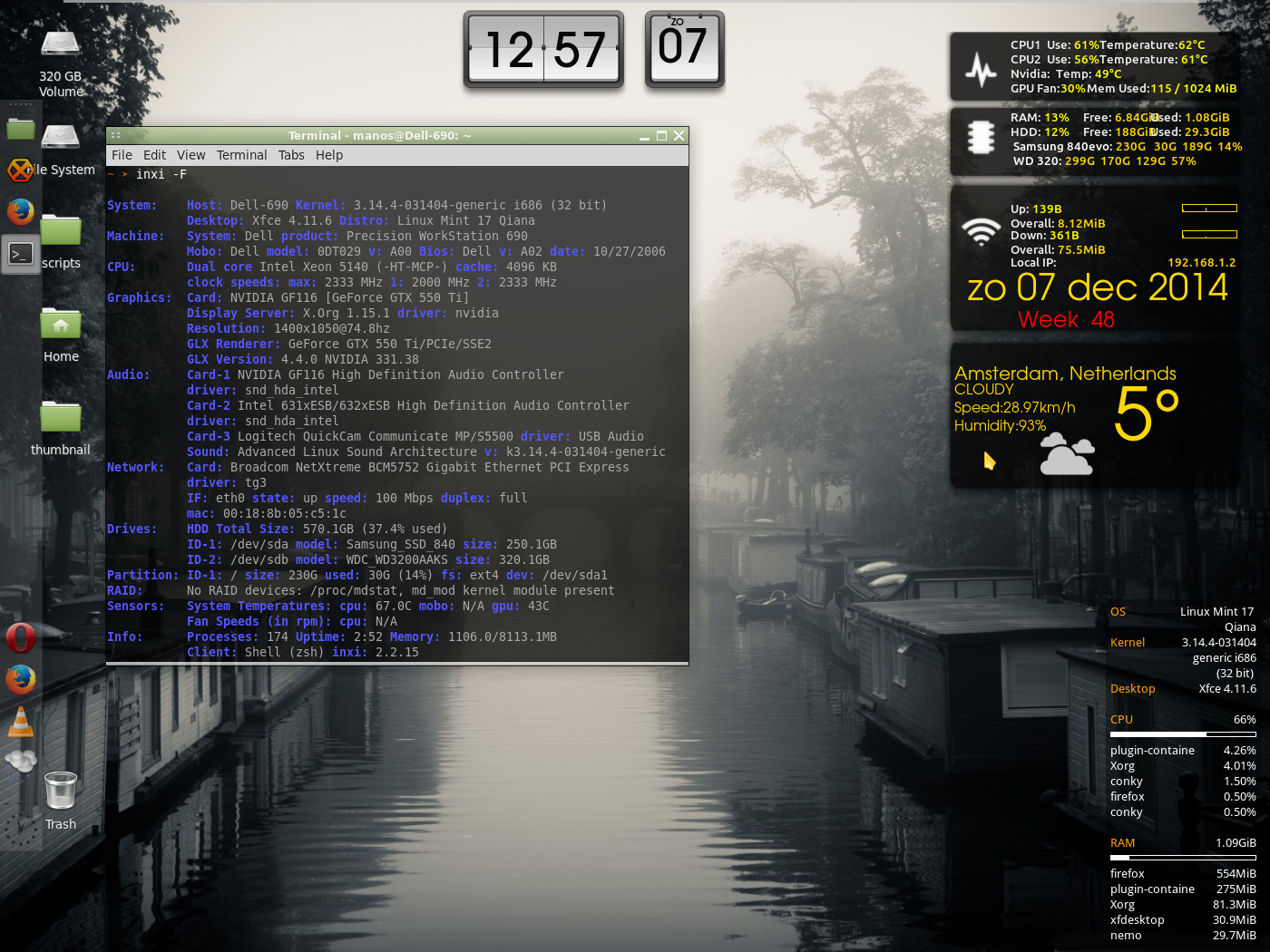
Useful commands if something go wrong in terminal :
>killall conky
Check your version and of course HELP:
>conky -- version
>conky -h
Ok have fun with this amazing program customize your conky,after all we are Penguins.